Responsive Login Form with BOOTSTRAP 5 | Transparent Login form with Glass Effect
Responsive Login Form with BOOTSTRAP 5 | Transparent Login form with Glass & hover Effect
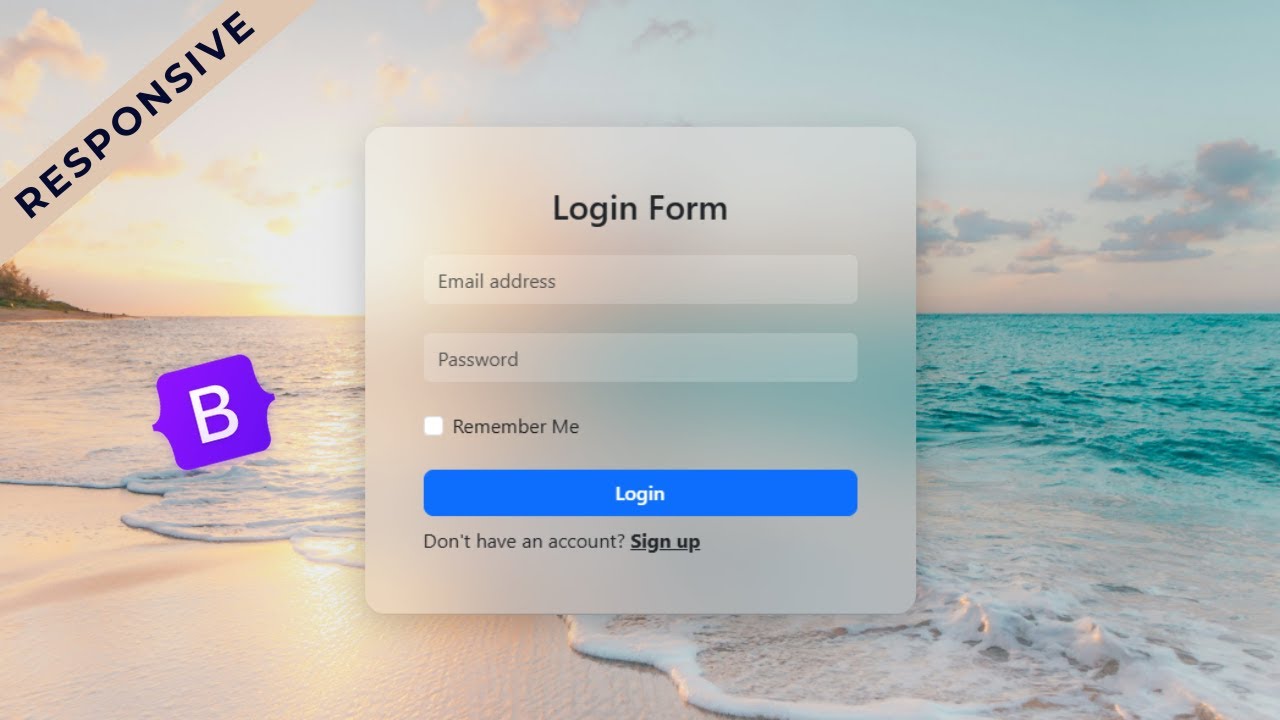
In this tutorial, you’ll learn how to create a fully responsive login form using Bootstrap 5. The design is modern, clean, and professional—featuring a transparent glass effect (glassmorphism) combined with smooth hover effects that make the UI look elegant and interactive.
Whether you are a beginner trying to practice front-end skills or a web developer looking to add stylish components to your project, this login form is a game changer. It’s lightweight, mobile-friendly, and built with only Bootstrap 5 classes, so you don’t need to write heavy custom CSS.
✨ Features of this Login Form
-
100% Responsive design (works on desktop, tablet, and mobile)
-
Glassmorphism (transparent background with blur effect)
-
Sleek hover animations for inputs and buttons
-
Clean and professional UI design
-
Easy to integrate into any website or project
Let's design a Login Form using Bootstrap 5.
Write HTML:
                                <!DOCTYPE html>
<html lang="en">

<head>
    <meta charset="UTF-8">
    <meta name="viewport" content="width=device-width, initial-scale=1">
    <title>Transparent Login Form using Bootstrap 5</title>
    <link href="https://cdn.jsdelivr.net/npm/bootstrap@5.3.8/dist/css/bootstrap.min.css" rel="stylesheet"
        integrity="sha384-sRIl4kxILFvY47J16cr9ZwB07vP4J8+LH7qKQnuqkuIAvNWLzeN8tE5YBujZqJLB" crossorigin="anonymous">
</head>
<body>

    <div class="container text-dark vh-100">
        <div class="row h-100 justify-content-center align-items-center">
            <div class="col-lg-5 col-md-8">
                <div class="login-card p-5 rounded-4">
                    <h3 class="mb-4 text-dark text-center">Login Form</h3>
                    <form action="">
                        <div class="mb-4">
                            <input type="email" class="form-control border-0" placeholder="Email Address" id="">
                        </div>
                        <div class="mb-4">
                            <input type="password" class="form-control border-0" placeholder="Password" id="">
                        </div>
                        <div class="mb-4">
                            <div class="form-check">
                                <input type="checkbox" name="" class="form-check-input" id="remember">
                                <label for="remember">Remember Me</label>
                            </div>
                        </div>
                        <div class="d-grid mb-2">
                            <button type="submit" class="btn btn-primary btn-login rounded-3 fw-semibold">Login</button>
                        </div>
                        <p class="mb-0">Don't Have an account? <a href="#" class="text-dark fw-bold">Sign up</a></p>
                    </form>
                </div>
            </div>
        </div>
    </div>


    <script src="https://cdn.jsdelivr.net/npm/bootstrap@5.3.8/dist/js/bootstrap.bundle.min.js"
        integrity="sha384-FKyoEForCGlyvwx9Hj09JcYn3nv7wiPVlz7YYwJrWVcXK/BmnVDxM+D2scQbITxI"
        crossorigin="anonymous"></script>

</body>

</html>
Let's Write CSS:
                                <style>
    body {
        background: url(bg-image.jpeg) no-repeat center center fixed;
        background-size: cover;
    }

    .login-card {
        background: rgba(255, 255, 255, 0.15);
        backdrop-filter: blur(30px);
        box-shadow: 0 8px 30px rgba(0, 0, 0, 0.2);
    }

    .form-control {
        background: rgba(255, 255, 255, 0.2);
        height: 40px;
    }

    .form-control:focus {
        background: rgba(255, 255, 255, 0.3);
    }

    .btn-login {
        transition: 0.3s;
    }

    .btn-login:hover {
        transform: translateY(-2px);
        box-shadow: 0px 5px 15px rgba(0, 0, 0, 0.3);
    }
</style>
Recent Post


Most Popular Post



Categories
- HTML & CSS9
- Bootstrap4
- Login Forms11
- Sidebar Menu1
- Card Design1
- CSS Buttons3
- Social Media Buttons1
- Preloader or Loaders5
- Neumorphism Designs3
- Contact Forms6
- Responsive Footers8
- Javascript4
- Websites3
- Bootstrap Cards0
- Vanilla JavaScript1
- jQuery Effects0
- Bootstrap Sidebar Menus0
- CSS Sidebar Menus0
- Navigation Bars4
- Responsive Gallery3
- Responsive Feedback Page5
- Blog0