

Introduction to ASP.NET Core MVC Framework

Introduction to ASP.NET Core MVC Framework
It follows the Model-View-Controller (MVC) architectural pattern, which helps developers organize application code into distinct, manageable components that improve testability, maintainability, and separation of concerns.
As part of the broader ASP.NET Core ecosystem, ASP.NET Core MVC supports cross-platform development, allowing you to build and run web applications on Windows, Linux, and macOS. This flexibility enables you to build secure, maintainable, and extensible web applications that are cloud-optimized and suitable for modern web standards. In this post, you will learn:
- The basics of ASP.NET Core MVC
- The MVC architectural pattern and its benefits
- The key features of ASP.NET Core MVC
- Project structure and code examples to get started
Whether you are new to web development or refreshing your skills, this session will help you confidently build applications using ASP.NET Core MVC.
What is MVC?
MVC stands for Model-View-Controller. It is an Architectural Design Pattern, which means it is used at the application’s architecture level. So, MVC is not a programming language, nor a Framework. It is a Design Pattern. When we design an application, we first create its architecture, and the MVC pattern plays a crucial role in designing that architecture. MVC helps developers separate the application logic into three interconnected components:
- Model: Manages the data and business logic.
- View: Handles the display and user interface.
- Controller: Handles user requests, interacts with the model, and selects the view to render.
The main objective of the MVC Design Pattern is the Separation of Concerns. This means the Domain Model and Business Logic are separated from the User Interface (i.e., View). As a result, maintaining and testing the application becomes simpler and easier.
Model in MVC?
The Model is the backbone of the MVC architecture, responsible for handling the core data, business rules, and logic of the application. It is responsible for managing the structure of the data, performing validation, and ensuring the integrity of business logic. The Model directly interacts with the Database to retrieve, update, and persist data as necessary. Importantly, the Model operates independently of the user interface, allowing it to be reused and tested separately from the View and Controller.
Roles of Model in MVC Design Pattern:
- Manages Application Data and Logic: The Model holds the application’s data and enforces all business rules and logic. This means it knows how data should be processed, validated, and related to other data.
- Handles Data Persistence: The Model communicates directly with the Database to fetch, insert, update, or delete information. This separation keeps the data layer distinct from how the information is displayed or interacted with.
- Ensures Reusability and Independence: As the model operates independently from the user interface, the Model can be reused across different types of applications and UIs. Changes to how data is presented (View) or how users interact (Controller) do not affect the Model itself.
- Validates and Secures Data: The Model is responsible for enforcing data validation, ensuring only valid and consistent information is stored or processed.
View in MVC:
The View is responsible for presenting the data to the end user. It receives data from the Controller (which fetches it from the Model) and renders it into a format suitable for the end user, such as HTML pages in a web application. The View focuses on how the data is presented and ensures the UI is dynamically rendered to reflect the current state of the data. While the View displays data and accepts user interactions (such as clicks and input), it contains minimal or no business logic.
Roles of View in MVC Design Pattern:
- Presents Data to the User: The View converts the Model’s data into a human-readable format, displaying it through UI elements. It is the only component with which the end user interacts directly.
- Renders Dynamic Content: In frameworks like ASP.NET Core MVC, Views are often written in HTML combined with Razor syntax, allowing them to be dynamically updated based on data from the Model.
- Minimal Business Logic: Views focus solely on presentation and should avoid embedding business logic. Their main role is to format and display data.
- Fetches Presentation Details: The view is responsible for fetching presentation data from the Controller, ensuring that the UI stays in sync with the underlying data.
Controller in MVC:
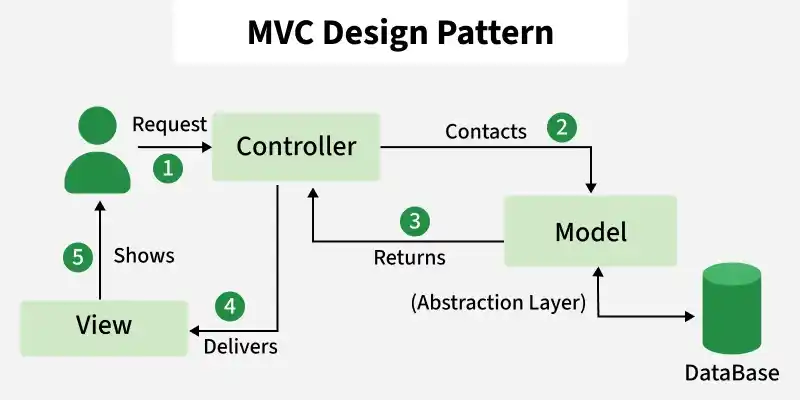
The Controller serves as the central coordinator for handling user requests and application flow. It receives input requests from the End User and manages interactions between the Model and View. The Controller processes the incoming requests by calling the appropriate Model methods to fetch or update data. Once the data is ready, the Controller selects the appropriate View to render the response back to the user. The Controller is focused on managing request flow and application logic, but it never directly handles business logic or data persistence.
Role of Controller in MVC Design Pattern:
- Handles User Requests and Inputs: The Controller listens for requests from the end user (such as clicks, form submissions, or API calls), processes these inputs, and determines what action should be taken.
- Coordinates Between Model and View: The Controller fetches or updates data via the Model and then passes the resulting data to the View for presentation. It ensures that the right data is displayed in the right format.
- Controls Application Flow: By managing the sequence of actions and responses, the Controller is responsible for routing, workflow logic, and ensuring that each user request is handled appropriately.
- Does Not Handle Data Logic: The Controller should never contain data logic; that responsibility lies strictly with the Model. Instead, it manages the process by delegating to the Model and View.
What is ASP.NET Core MVC:
ASP.NET Core MVC is a modern, cross-platform framework used for building Web applications and APIs using the MVC design pattern. MVC stands for Model-View-Controller, an architectural pattern that separates an application into three main components:
- Model: Represents the application’s data and business logic.
- View: Defines the UI (User Interface) using which the end user interacts.
- Controller: Handles user requests, interacts with the model, and selects the view to render.
ASP.NET Core MVC is cross-platform (runs on Windows, Linux, macOS), fast, and supports cloud-based development. It is the successor to the traditional ASP.NET MVC framework.
How Does the MVC Design Pattern Work in ASP.NET Core MVC?
Conclusion:
ASP.NET Core stands out as a versatile, scalable, and highly optimized framework. Whether you are developing lightweight microservices, high-traffic APIs, or massive enterprise systems, it supplies the necessary modern infrastructure. Mastery of its fundamentals—such as DI, routing, and middleware—equips developers to build maintainable applications within the broader C# ecosystem
Recent Post


Most Popular Post


Categories
Related Post
-
No Related Snippets